One recording. A small win worth sharing.
This project was built entirely using OpenAI Codex, under Mervin Praison’s direction—from implementation and debugging to tests, documentation, and deployment. It was prepared for the community-led Cambridge Codex Community Challenge.
The everyday task: take a long recording, find a complete thought, make a captioned vertical clip, and check it before sharing. PraisonAI Clips brings those steps into one local workflow.
01 / WHAT I MADE
A recording-to-clips workflow
A local app that selects moments, frames vertical video, adds highlighted captions, and separates accepted clips from uncertain drafts.
02 / WHAT I CHANGED
Show the result before setup
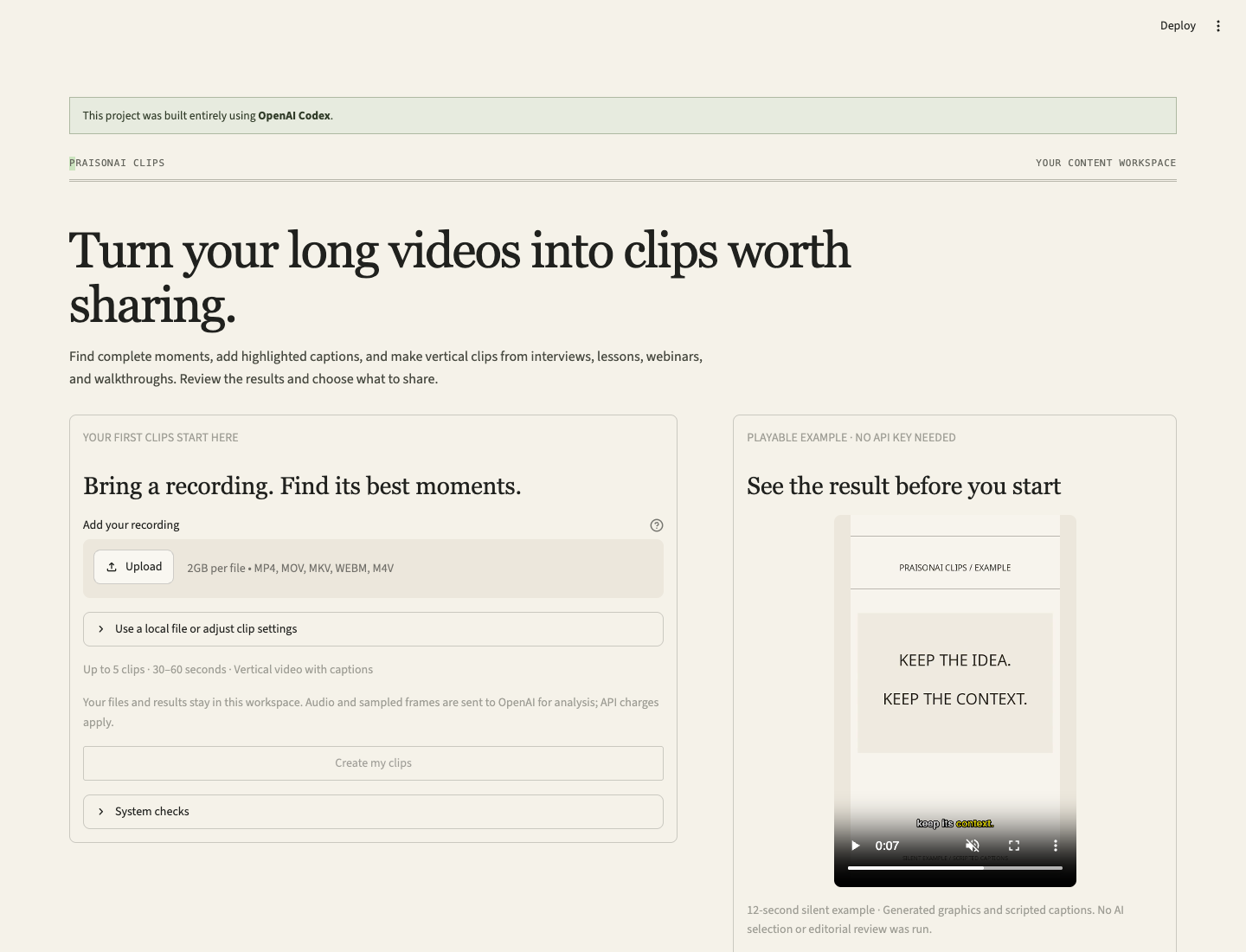
A playable example, a main-screen upload, and a setup check replaced an explanation-first opening with an immediate way to explore the output.
03 / WHAT I CHECKED
Test the path to the first clip
Rendering, caption timing, review/repair, resume, and first-run guards have automated coverage. Browser checks cover example playback and downloads.
Watch the walkthrough
Open the video directly · Try the short example · Explore the code
The walkthrough records the local application and uses the public generated example. Its word timings and edit are scripted. It demonstrates the renderer, exported files, and first-run experience; it does not depict a new transcription or AI selection run. Real-provider and native-editor validation are documented separately below.
The request behind the improvement
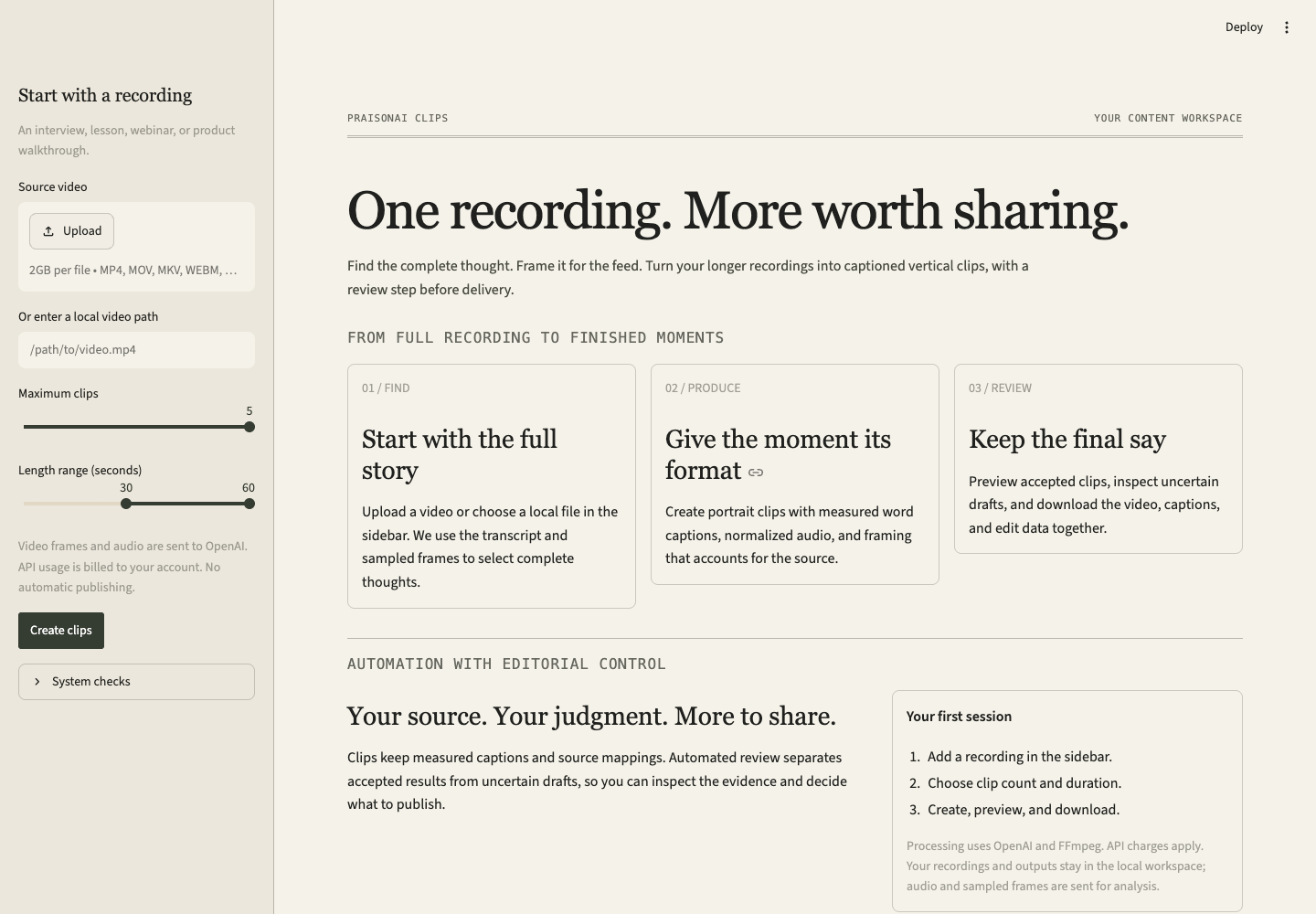
The request was to make the app understandable and convincing to a new user. The improvement put the upload beside a playable example and added setup checks before processing. The check covered browser playback, the downloadable example bundle, and automated first-run tests. The example uses generated media and scripted captions, so it does not demonstrate a fresh AI selection.
The improvement you can see
The earlier first-run screen explained the workflow, but the upload lived in a sidebar and visitors could not inspect an example result. The revised screen puts an upload beside a playable clip and a downloadable bundle. It checks for an API key and compatible FFmpeg before enabling processing.
What the checks establish
| Check | Evidence | Boundary |
|---|---|---|
| Local automated suite | Verification snapshot and test source | Optional runtime tests are skipped when their dependencies are absent. |
| End-to-end render, repair, and resume | Pipeline regression uses real FFmpeg output and a clearly labelled synthetic API backend | This test checks application behavior without paid provider calls. |
| Real-video processing | A four-minute validation produced three captioned candidates; one passed review and two remained uncertain drafts. Read the report. | A recorded engineering run, rather than a general quality or acceptance-rate claim. |
| First-run behavior | Onboarding regressions check missing setup, missing input, invalid paths, and the example bundle’s explicit file list | No paid request is started by these tests. |
| Public website | The custom domain serves the example video, documentation, and code links over HTTPS | GitHub Pages hosts static pages. Process personal recordings in the local Streamlit app. |
| Native editor framing | Kdenlive and Resolve reports record framing changes and restoration | Tested workflows are version-dependent; broader operations require separate validation. |
Run the checks yourself:
python -m pip install -e '.[dev,live]'
pytest -q
FFmpeg must include subtitle rendering, audio normalization, and H.264 encoding. Tests for optional local editor runtimes may skip. The Verify project workflow repeats the portable suite on GitHub; it does not connect to a desktop editor or call OpenAI.
What Codex contributed
The work happened through a cycle of requests, implementation, inspection, and revision: build the processing workflow, test it on real media, add guarded editor control, simplify the first visit, check privacy, and publish the site. The improvement above came from asking Codex to make the experience convincing to a new visitor, then checking the result with actual browser playback, a downloaded ZIP, and automated first-run tests.
The project uses OpenAI, FFmpeg, Streamlit, MkDocs Material, and optional editor integrations. Existing third-party code, fonts, and license notices retain their attribution.
Try the small win
Watch the generated example, run the local app, or inspect the SDK. Your final publishing decision stays with you: preview the framing, check the captions, and listen to the clip.